
How To Check SASSA Status
 Fact-checked by
Your SASSA status can only be checked in one place: SASSA's official SRD portal. Here you'll find the steps, what each status means, and what you do next. Grant Africa never asks for your ID number or phone number.
Two minutes. That's honestly all it takes, and it won't cost you a cent. But there's a catch. Your status lives in exactly one place, SASSA's official SRD portal. Nowhere else. Below you'll find the steps. Then what the word on your screen actually means, and what you do with it, good news or bad.
But first, let's be upfront about something. The checker on our homepage fetches your status from SASSA's official system. The ID number and phone number you type go straight to SASSA, and Grant Africa stores none of it. We never ask for your PIN or your banking details. Rather not type your details anywhere but the official site? That works too. This guide points you to the right door and walks you right up to it.
What You Need Before You Check
The portal will ask you for two things. Only two:
- Your South African ID number. The same one you used when you applied.
- The cellphone number from your application. Use the number you registered with when you applied for the grant. A new number won't work. Neither will a borrowed one.
And hear this properly: those details go into SASSA's official portal only. Not here. Not into some app a stranger sent you a link to, and please, not on a Facebook page or a site that popped up in an advert. A website that's not the official portal asks for them? Close it. Walk away.
Step By Step: Check Your SRD R370 Status On The Official Portal
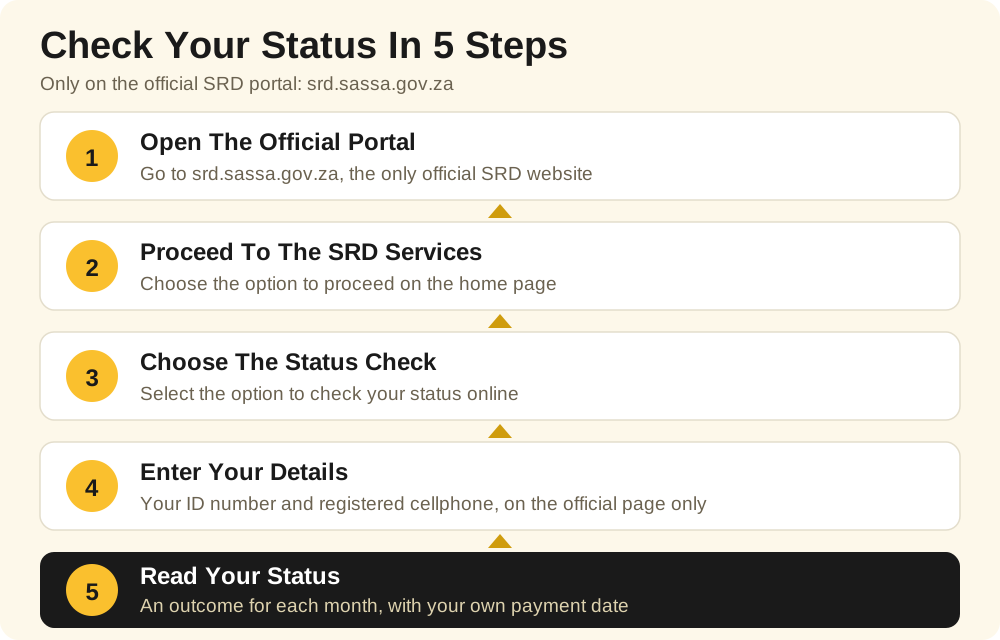
- Open the official SRD portal. Type srd.sassa.gov.za into your browser. Look at the address before you do anything else: the real portal sits on a sassa.gov.za address.
- Choose to proceed. On the home page, pick the option that takes you through to the SRD services.
- Choose the status check. Select the option to check your application status online.
- Enter your details, on that page only. Your ID number and the cellphone number from your application. Then submit.
- Read your status month by month. The portal gives you a separate outcome for every month. Where a month is approved, your own payment date sits right there next to it.
That's it. Done. Now, if the portal crawls or freezes, don't go hunting for help on unofficial sites. Payday weeks hammer that portal; everyone is checking at once. Give it a while and try again later, maybe after lunch. Your real status lives on the official portal, full stop, nowhere else. So that's where you wait it out.
Checking The Status Of Other Grants
One thing people mix up all the time: the online status check on the SRD portal belongs to the SRD R370 grant only. The permanent grants are a different story. Older Persons, Disability, Child Support, Foster Child, Care Dependency, Grant-in-Aid and War Veterans grants get paid on SASSA's official monthly payment dates, which you'll find further down this page. Got a question about your own permanent grant? Use the official contact channels on sassa.gov.za, or take your ID document to your nearest SASSA office and ask there.
What Your Status Means
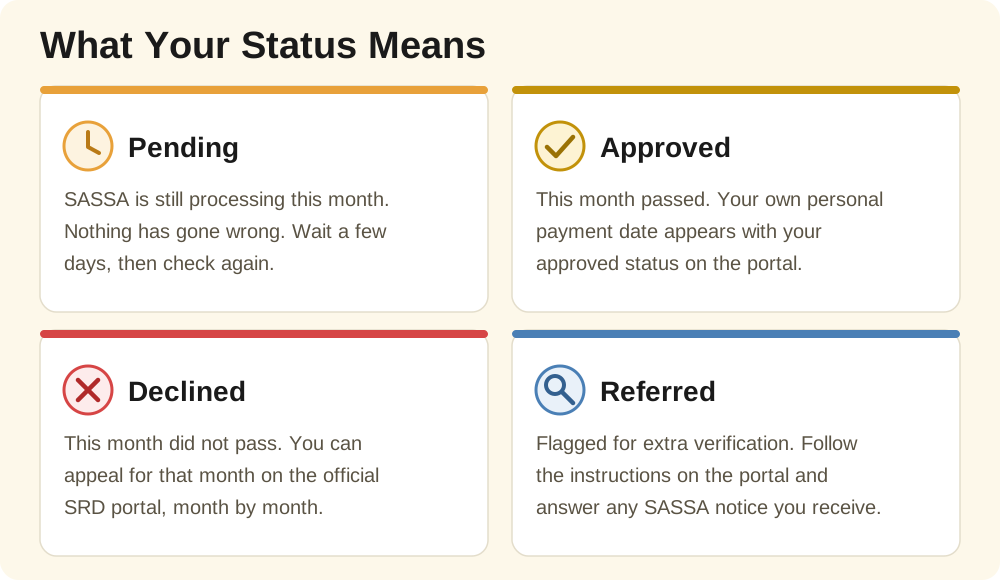
So you checked. Now a word is staring back at you, and you're not sure what it wants from you. It'll be one of these, per month. Here's each one, plainly, and what you do about it.
Pending
What it means: SASSA hasn't finished with that month yet. Your application, or that month's check, is still being processed. Nothing's gone wrong.
Your next step: wait. Give it a few days, then check again on the official portal. And keep the phone number from your application switched on and close by, because that's where SASSA sends its notices.
Approved
What it means: good news. That month passed, and a payment for it is coming.
Your next step: look at the payment date on the same screen. With SRD there's no national payday that fits everybody. Your date is yours alone, and it appears with your approved status.
Declined
What it means: that month's check didn't pass. It happens more often than people think. Sometimes it's income sitting in the bank account linked to your ID. Or your details just couldn't be verified, that happens too.
Your next step: don't panic, and don't just accept it either. You can appeal for that month on the official SRD portal. How? The next section walks you through it.
Referred
What it means: your application got flagged for a closer look. Extra verification. SASSA may be checking it against other government databases, or running a fraud-risk check.
Your next step: follow whatever instructions the official portal shows you, and answer any SASSA notice that reaches you. Keep your ID document handy, and the phone number from your application.
If Your Status Says Declined: How To Appeal
- Go back to the official SRD portal at srd.sassa.gov.za.
- Choose the appeal option, then select the month that was declined.
- Work through the steps on the official page and submit your appeal.
- Now do the same for every other declined month. Appeals work month by month. One appeal covers one month, never the rest.
And it costs nothing. An appeal is free, full stop. So if somebody offers to appeal for you, for a fee, or promises they can change your outcome, you're looking at a scam. Walk away.
SASSA Payment Dates For November 2026
Why are the dates different this time? Because Wednesday 4 November 2026 is a local government election public holiday. SASSA moved this whole payment cycle in its statement of 14 October 2026. The dates below are the revised, official ones:
| Grant | Payment Date |
|---|---|
| Older Persons Grant | Friday, 30 October 2026 |
| Disability Grant | Monday, 2 November 2026 |
| Children's Grants | Tuesday, 3 November 2026 |
| Grants Under Review | Thursday, 5 November 2026 |
SRD R370: no fixed date here. Yours is personal, and it shows with your approved status on the official portal. One more thing worth knowing: your money doesn't vanish if you leave it sitting there. It stays in your account after payday, so skip the first-day queue if you can. There's no prize for withdrawing everything at once.
Stay Safe: Only Trust The Official Websites
- Only two websites are official: srd.sassa.gov.za for SRD, and sassa.gov.za for everything else. Bookmark them. Trust nothing that merely looks like them.
- Never share your PIN. Not with us, not with anyone. SASSA will never ask for it.
- Never pay to check. Checking is free. Appealing is free. The moment money enters the story, it's a scam.
- Grant Africa collects nothing. There is no form on this site for your ID number or phone number. Our homepage checker helper simply shows you the official steps and hands you over to SASSA's own websites.
Found this useful? Then the safest next step is the official portal itself, not another guide. And if you spot a mistake in this one, tell us. Email us at info@grantafrica.co.za and we'll check it. Readers do send corrections, and yes, we read them, check them, and fix what's wrong.
Questions People Ask About This Page
Can Grant Africa Check My Status For Me?
No, we can't. Grant Africa can't see anyone's grant status, and we never ask for your ID number or phone number either. Only you can check your status, on SASSA's official SRD portal at srd.sassa.gov.za, using your ID number and the cellphone number you applied with.
Why Does My Status Say Pending?
It means SASSA is still busy with that month's check. It doesn't mean you were declined. Give it a few days, then check again on the official portal.
How Do I Appeal If My SRD Month Was Declined?
Go to the official SRD portal at srd.sassa.gov.za and use the appeal option for the month that was declined. Appeals work month by month, so a separate appeal goes in for every month that shows Declined.
When Will My SRD R370 Be Paid?
There's no single SRD payday for everyone. Your payment date is personal to you, and it appears with your approved status on the official SRD portal.
What Must I Never Do When Checking My Status?
Never type your ID number, phone number, PIN or banking details into any website other than SASSA's official websites. And never pay anyone who offers to check your status or speed up your grant. Checking your status is free.

Facts, Checked Against Trusted Sources
- SASSA moved the November 2026 payment cycle. In its statement of 14 October 2026, SASSA explained why: Wednesday 4 November 2026 is a local government election public holiday. Source: SASSA
- The revised November 2026 payment dates are: Older Persons Grant on Friday 30 October 2026, Disability Grant on Monday 2 November 2026, Children's Grants on Tuesday 3 November 2026, and grants under review on Thursday 5 November 2026. Source: SASSA
- The SRD grant pays R370 per month, and every approved month carries its own personal payment date, which you will see with your status on the official SRD portal. Source: SASSA SRD Portal
- SRD appeals work month by month. Two declined months? Then two appeals are needed, one for each month, on the official portal. Source: SASSA SRD Portal