SASSA Status Check: Check Your SRD R370 Status And Payment Date
Welcome to Grant Africa. This page does one job: a full status check for your SRD grant on official channels only, with every result explained in plain language. No jargon. No guesswork.
Here's the part people learn the hard way. The South African Social Security Agency (SASSA) checks every SRD application again each month. From scratch, every month. Last month's answer? It guarantees nothing. Approved one cycle, declined the very next, and half the time the screen won't tell you why.
We keep this guide and check routine dead simple on purpose. What's on this page? The portal steps. The official channels. What each status really means. The 2026 payment dates. The appeal route. The fixes for the problems applicants raise with us again. When your details are in order, these status checks take minutes.
SASSA Status Check: Check Your SRD R370 Status And Payment Date
The main grant payment dates for the 2026/27 year. SRD R370 paydays are personal, so check yours with the checker above.
| Month | Older Persons Grant | Disability Grant | Children's Grants |
|---|
| April 2026 | Thursday, 2 April | Tuesday, 7 April | Wednesday, 8 April |
| May 2026 | Tuesday, 5 May | Wednesday, 6 May | Thursday, 7 May |
| June 2026 | Tuesday, 2 June | Wednesday, 3 June | Thursday, 4 June |
| July 2026 | Thursday, 2 July | Friday, 3 July | Monday, 6 July |
| August 2026 | Tuesday, 4 August | Wednesday, 5 August | Thursday, 6 August |
| September 2026 | Wednesday, 2 September | Thursday, 3 September | Friday, 4 September |
| October 2026 | Friday, 2 October | Monday, 5 October | Tuesday, 6 October |
| November 2026 Current Month | Friday, 30 October (Revised) | Monday, 2 November (Revised) | Tuesday, 3 November (Revised) |
| December 2026 | Wednesday, 2 December | Thursday, 3 December | Friday, 4 December |
| January 2027 | Tuesday, 5 January | Wednesday, 6 January | Thursday, 7 January |
| February 2027 | Tuesday, 2 February | Wednesday, 3 February | Thursday, 4 February |
| March 2027 | Tuesday, 2 March | Wednesday, 3 March | Thursday, 4 March |
Source: Department of Social Development, 2026/27 payment schedule.
What Do You Need Before Checking Your SASSA Status?
Two things. Your 13-digit ID number, and the cellphone number you used on your application. The portal matches them against each other, and that's why no official channel will run a check on an ID alone.
Our Status Checker Helper below does the real check. Type in your ID number and the mobile number on your application, and it fetches your status straight from SASSA's official system, the same system the SRD website uses. Nothing gets stored on this page. Grant Africa keeps no copy of your details. The helper shows you the result SASSA returns, and that is the end of it. Rather use the official site itself? The link under the helper takes you to srd.sassa.gov.za, and every step in this guide works there too.
Think of this page as your SASSA status check for SRD R370 applicants. The steps live here. The live result lives on the portal, and only on the portal. When you want to check your status, it takes under a minute.
Most failed status checks start with one wrong detail. A SIM swap. A new handset. A number registered in somebody else's name, and the portal returns no result. Keep the number from your application active. That's the number SASSA uses for one-time passwords and outcome messages, and if it dies, everything stops.
How Does A SASSA SRD Status Check Online Work, Step By Step?
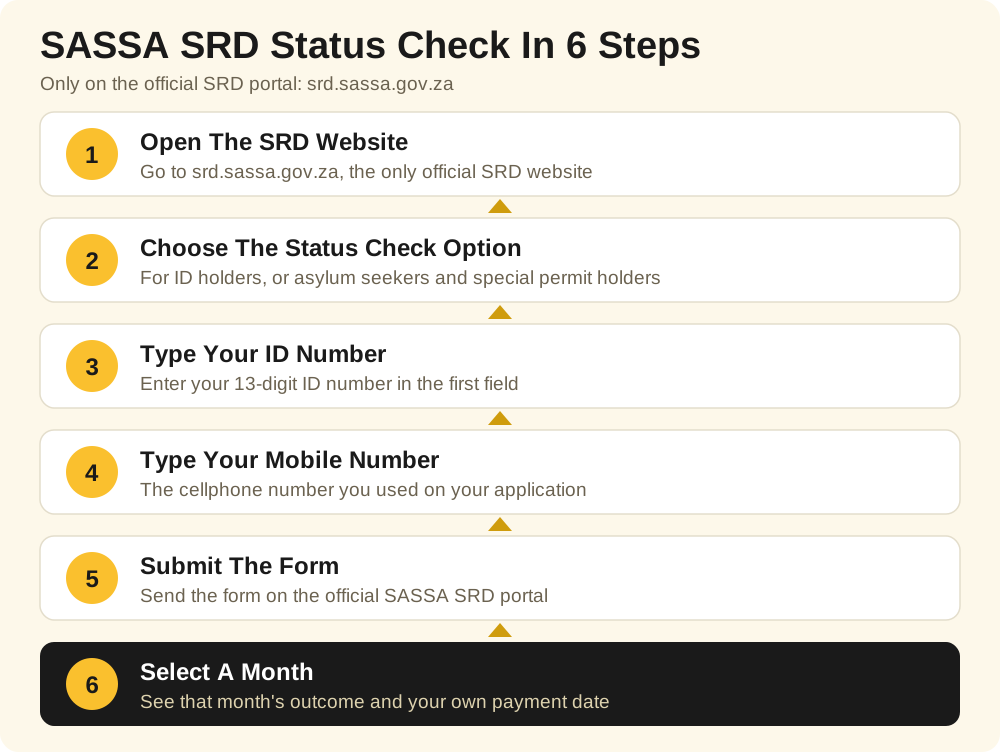
Most checks happen on the official SASSA SRD portal at srd.sassa.gov.za. You check your SRD status by entering your ID number and your registered cellphone number, and the portal shows you a result for each month. One month, one answer. And the status check form asks for the same two details every time, so there's nothing new to learn.
- Open the SRD website at srd.sassa.gov.za. That exact address. Type it yourself if you can.
- Choose the status check option for ID holders, or the option for asylum seekers and special permit holders.
- Type your ID number in the first field. One wrong digit and you're chasing somebody else's result.
- Type the mobile number from your application in the second field.
- Submit the form on the official SASSA SRD portal and wait for the result screen.
- Select a month to see its outcome, and the date where SASSA has loaded one.
The result screen gives you one status per month, because SASSA assesses every month on its own. Approved in October? That tells you nothing about November. What your SASSA status check shows for one month never settles the next month.
And do this one small thing. When you check your SASSA SRD status, save a screenshot of the result screen. That screenshot is your proof later, at an office or in an appeal, if anybody asks.
What Are The Official Ways To Check The SRD Grant Status?
The portal isn't your only route. Several official channels exist, and here's the part people miss: every one of them reads the same SASSA grant database. You read your status through the official channel you pick. And you can check SRD results on a smartphone, on a basic phone, even on a borrowed phone, as long as the owner says yes.
The SRD Portal
The official SASSA SRD portal at srd.sassa.gov.za is the main route. Enter your ID number and the cellphone number on your application, and the portal shows one result per month, with the payday where SASSA has loaded one.
WhatsApp
Save the official SASSA WhatsApp number, 082 046 8553, and send the word "Hi". Follow the menu, choose the SRD option, and enter your ID number and cellphone number when the chat asks. Your monthly results come back in the conversation.
USSD
Dial *134*7737# from the phone that carries your application number. No smartphone needed. No data needed. It works on the most basic handset. During our research, we found the USSD menu fails on some networks, though. When it throws an error, move to WhatsApp or the portal instead.
Phone
Call SASSA on 0800 60 10 11, the toll-free line, and ask the agent to read your monthly results to you. Costs nothing from a South African number. One warning: lines jam near payment dates, so call early in the morning. While you're at it, save the SASSA contact details in your phone.
Office
Visit your nearest SASSA office with your ID document when the other channels fail you. An official there can pull up your record and print your monthly outcomes for you.
One more thing. SASSA never charges a fee for a status check. Not a cent. No agent, no shop, no social media page can sell you a faster result. All status checks on official channels cost nothing.
What Does Your SRD Status Mean?
Your application status is SASSA's decision for one month. Only one month. Treat the portal result as your official status, even when another channel is showing you an older result.
The Table Below Shows The Common SRD Statuses And The Action Each One Needs.
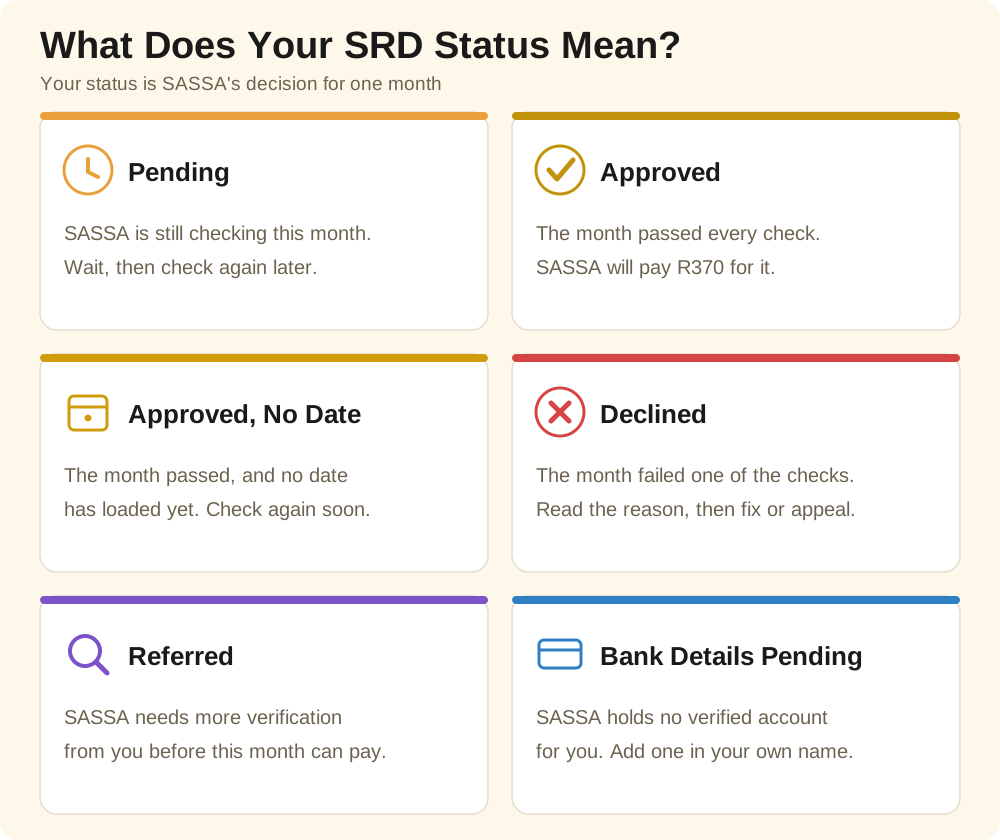
⏳Pending: SASSA Is Still Checking This Month
Pending is the waiting room. SASSA has your application, and that month is being verified against Home Affairs, bank, and UIF records. Nothing has been decided yet. So don't read it as a no, because it isn't one. Most pending months settle before the payment run.
✅Approved: The Month Passed, And A Pay Date Follows
Approved means the month passed every check, and SASSA will pay R370 for it. Your payment status for the month sits on the same screen, and the date joins it once the payment file loads. Banks release money through the day. So check again by evening before you worry.
📅Approved With No Pay Date Yet
An approved month with no date next to it? That's a timing gap, not a problem with your grant. SASSA loads dates in batches, so yours can land days after the approval. Applicants panic at that empty space. Queuing at offices. For an answer the portal gives them free at home.
❌Declined: The Month Failed A Check, And SASSA Shows The Reason
Declined means one check failed for that month. Just one. And the portal prints the reason right next to the month. So read the reason, not just the word. The common ones? An alternative income source in your bank account. A UIF registration. An identity mismatch. Another grant paid to you. The reason matters more than the word, because it tells you what happens next. Fix a detail. Or appeal.
🔍Referred: SASSA Needs More Verification From You
A referred status shows SASSA flagged your application for extra checks, often around identity or fraud risk. In plain language, referred means SASSA must confirm that the person who applied and the person who gets paid are one and the same person. Check your identity details against your ID document, letter by letter, and finish any SMS verification step the same day it arrives. A referred month pays only after that verification clears.
🏦Bank Details Pending: SASSA Has No Verified Account For You
Your month can pass every check and still not pay, because SASSA holds no payment method for you. Frustrating, but fixable. The grant waits until a valid account in your own name passes bank verification. The fix sits in the banking section below.
What Are The SASSA Payment Dates For November 2026?
SASSA pays the main grants in the first week of the month. Older persons first. Then disability. Then children's grants. The table shows two cycles: October 2026, already paid, and November 2026, which carries a revision.
Both cycles follow the 2026/27 schedule of the Department of Social Development, with SASSA's 14 October 2026 revision applied.
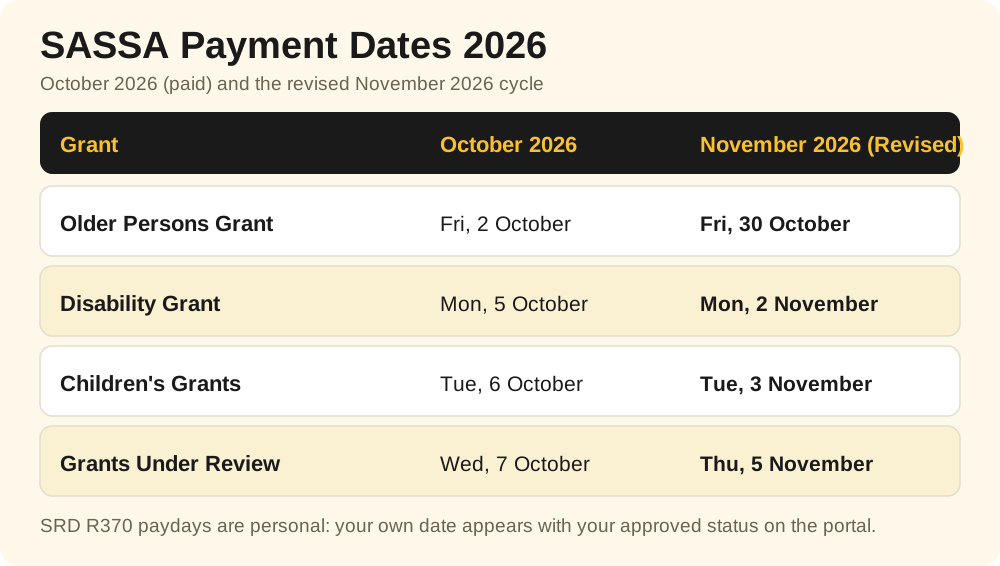
SASSA has confirmed the November change in an official statement. The cycle moved for the local government elections. Your money stays in your account after payday, so skip the first-day queue. Keep this payment dates 2026 table safe.
Dates move when a payday lands on a weekend or a public holiday, so check the SASSA payment dates on official SASSA channels first.
The July 2026 SASSA cycle paid in the same order: older persons on Thursday the 2nd, disability on Friday the 3rd, and children's grants on Monday the 6th.
The SRD R370 payment dates never sit in a table like this one. Lists of SRD payment dates mislead readers, because each approved month carries a personal date, and the next part explains how that date works.
Why Does The SASSA SRD R370 Grant Have No Fixed Pay Date?
Looking for the SRD payday in a table? There isn't one. Your payday is personal. It appears next to your approved status on the portal, and it's the only SRD date that applies to you. SASSA has not published one date for every SRD beneficiary. It can't. Your date hangs on your approval, not on a calendar.
Date passed, account still empty? Don't sprint to an office. It's usually one of three things: the batch hasn't reached your date yet, the bank returned the payment, or your payment is still being processed. Give it a few working days. Still empty? Call the SASSA toll-free line and ask what's holding it.
Your SRD Application Was Declined: What Can You Do Next?
One month. That's all a decline is. One month that failed, not your whole application. The law gives you a way to challenge it.
Read the reason on your result screen. Always the reason. A wrong bank record can do it. So can an old UIF registration. Or a once-off deposit from a family member. Each one can sink a month. And where the reason points at a wrong detail? Fix the detail first.
How Does The SRD Appeal Process Work, Step By Step?
Every declined month carries this right: you have the right to appeal the SASSA decision for that month, separately from every other month. The appeal lands with the Department of Social Development. The Independent Tribunal for Social Assistance Appeals decides it. Not SASSA.
- Open the appeals page on the Department of Social Development appeals site at srd.dsd.gov.za.
- Enter your ID number and the number from your application.
- Type the PIN that arrives by SMS. It expires fast, so don't wander off.
- Pick the declined month you want to challenge.
- Give your reason and submit the appeal.
The clock is the catch. Lodge inside 90 days of that month's decline, because a late appeal closes without a hearing. It costs nothing. No lawyer, no fee. The tribunal is buried in appeals, so an outcome can take time. Watch the number on your application for the result message. You can check the status of your appeal with the same ID and phone details.
How Do You Update The Bank Details And Phone Number On Your Application?
Wrong payment details cause more unpaid approved months than anything else. The money can only land in a bank account carrying your name. Yours. Not a partner's, not a parent's, not a friend's. SASSA cannot pay into an account that belongs to somebody else. So keep the details on the SRD application current, because every payment follows them. Every message too.
Changing your bank details? Start on the SRD portal. Open the banking details section, enter your ID number, and follow the secure link that arrives by SMS. Always use the official SRD portal for a banking change. Type the new account number slowly, then submit. One wrong digit and the money visits a stranger. The bank must verify the account against your ID before a payment can use it. Check after the next payday.
Call SASSA on 0800 60 10 11 and ask the agent to update the mobile number on your application, or ask at an office visit. Do it the moment yours changes. The number on your application is the number SASSA talks to. Your one-time password goes there. Your appeal PIN. Your outcome messages. A dead number blocks all of it.
Who Qualifies For The SRD R370 Grant In 2026?
The SASSA SRD grant pays R370 a month, for adults with insufficient means. According to the SRD portal, you qualify when every point on this list is true:
- You are a South African citizen, a refugee, an asylum seeker, or a special permit holder from Zimbabwe, Angola, or Lesotho
- You are between the ages of 18 and 60 years
- The money flowing into your bank account stays under R624 per month. Everything counts toward it, even a once-off deposit from your brother
- You hold no other social grant in your name
- You do not receive or qualify for Unemployment Insurance Fund payments
- You receive no financial support from another source that maintains you
Read the SRD eligibility rules as one set, because one failed rule fails the whole month.
The history, quickly. The grant began in 2020 as the COVID-19 SRD grant at R350 per month. In April 2024 it rose to R370. National Treasury funds the R370 payment until 31 March 2027. The amount stays R370 for every approved month of your 2026 SRD cycle.
The Table Below Shows The Monthly Amounts Of The Main SASSA Grants For 2026/27.
Amounts change with the national budget, so confirm a live amount first.
Why Does Your Status Change From One Month To The Next?
Approved in September, declined in October, and you changed nothing? SASSA runs a fresh set of checks for every month. Your bank inflows, your UIF record, your identity data: October's don't match September's. So your status may change on its own. A gift from a relative lands on the wrong date. A short piece job pays you. Money meant for somebody else arrives by mistake. Any of them can flip a month from approved to declined. Your one SRD grant application stays in place through all of it.
During our research, at the offices we visited, the same three problems surfaced. First: a decline with a reason the applicant swears they've never seen, usually an income record from a forgotten bank account. Second: a changed number, locking the applicant out of every channel. Third: a status stuck on pending while the neighbours have outcomes, an identity detail that reads differently at Home Affairs than on the application.
Checking your SASSA status every month catches the wrong detail while an appeal window stands open. Monthly status checks take two minutes. Two. Against a declined month found three months late.
How Do You Spot A SASSA Scam Before It Costs You Money?
They're polished. SASSA branding copied, fast approvals promised, shortcuts for a fee. But the warning signs repeat. A message asking for your PIN, or your one-time password. A fee for an application, or an appeal. A website off the official domains, asking for your details. Fake status checks harvest ID details every week. And a paid check status offer? A scam, every time.
Hold three facts against every message. One: SASSA will never ask for your PIN, your password, or money for a status check, an application, or an appeal. Two: the only official SASSA SRD website is srd.sassa.gov.za, and SASSA's own channels link back to it. Typing SRD into a search engine returns copycat pages among the results, so read the address bar before you type anything. Three: the official SASSA website carries the agency's current warnings. Compare any suspicious message against that.
Smell a rat? Report fraud on the SASSA fraud hotline, 0800 701 701. Grant Africa asks for no personal details and no payment anywhere on our site. A page using our name to ask for those things is a fake.
What Do The Official Numbers Say About Grants In South Africa?
Why fuss over a two-minute check? Because grants carry this country. Statistics South Africa, in its Poverty Trends release, puts 37.9 percent of South Africans below the lower-bound poverty line of R1,300 per person per month in 2023. That's about 23.2 million people. Another 17.6 percent, about 10.8 million people, live below the food poverty line of R777.
Social grants form the main source of income for 67.9 percent of households headed by older persons. Two out of three. National Treasury counted 4.1 million Older Persons Grant recipients in 2024.
Statistics South Africa counted about 3.3 million people with disabilities in Census 2022. About 2 in every 100 children aged 5 to 9 live with a disability. A classroom of fifty: one child.
And the SRD grant itself? About 8.2 million people receive the R370 SRD payment each month.
Questions Applicants Ask Us About Status Checks
Can I check my status with only my ID number?
No. Every official check wants the pair: your ID number with the cellphone number on your application. One without the other gets nothing. A site promising an ID-only check is collecting you, not checking you.
Do I need to apply again every month?
No. One application covers you, and SASSA reassesses it monthly, on its own. You move only when a detail changes, when SASSA asks for a verification step, or when you appeal a declined month.
My status says approved, so where is my SRD money?
Start with the date beside the approved month. No date yet? No payment yet. Date there? Check your balance at an ATM or in your banking app. Still empty? Usually a returned payment, or an account that was never verified. Confirm your banking details on the portal.
Can another person run the check for me?
Yes, with your permission. The helper needs your ID number and your application phone. But the result lands on their screen, in their hands. Stay present while the check runs.
The portal is down. What should I do?
Wait and retry later, or use WhatsApp or the toll-free line, which read the same record. Outages pile up near payment dates. Your status stays on record.
Ready To Run Your SASSA Status Check?
That's the full route. The helper at the top. The official portal. The appeal route for a month SASSA got wrong. Run your check, read the result, and do the one step your status asks for. Then check your status again next month, because every month is judged on its own.
Did we get a detail wrong on this page? Write to us at info@grantafrica.co.za and we will verify and correct it. For the short version, read our guide on how to check SASSA status, which walks through the same route step by step.